
Back to VixScale.comVixSync is a product of VixScale Technologies
✳ One workspace for the conversations that grow your business. Explore the platform
YOUR PEOPLE. YOUR CHANNELS. IN SYNC.

Great conversations.
Less busywork.

AI that chats, speaks, calls, and follows through.
Connect website chat, WhatsApp, Facebook Messenger, phone calls and lead follow-ups in one workspace.

Put your business in sync
Built around your business Your team stays in control
A LITTLE AI. A LOT MORE POSSIBILITY.
YOUR KNOWLEDGE. YOUR VOICE.

A great conversation. An even better first impression.

Give every visitor a helpful answer, grounded in your business knowledge. Turn a simple hello into the start of something.

Explore ai chat
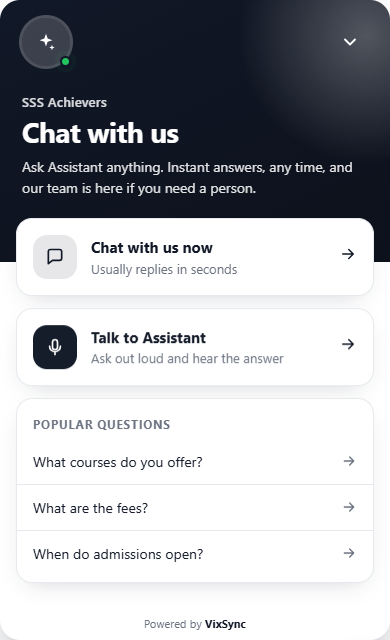
Interactive product preview
The real VixSync widget: Chat with us, chat and Talk to Assistant options, and popular questionsActual VixSync widget interface · Example business configurationTry your own assistant
LESS TAB-SWITCHING.
MORE DOT-CONNECTING.
Website
WhatsApp
Email
Voice
Your team
MADE FOR YOUR EVERYDAY. AND YOUR NEXT BIG THING.

All the moving parts.
Finally, moving together.

From the first question to the next opportunity,
give your business room to do more.

AC

Does this work with my website?

Yes. Add your knowledge.
Make yourself at home. ✦

An answer with your expertise.
01 / CONVERSATIONS

Your best first impression.
Every single time.

Helpful AI answers, grounded in your content. A warm welcome on your website, even when your team is away.

A hello becomes a next step.
02 / AUTOMATION

Keep the momentum.
Skip the manual work.

Follow up, organize contacts, and connect your channels with workflows that work alongside your team.

→YOU
Your team is taking it from here.
03 / HUMAN CONNECTION

AI when it helps.
You when it matters.

Take over any conversation with its history intact. Your people bring the judgment. VixSync keeps the context.

Bring your team together
FROM THE FIRST QUESTION TO THE NEXT ACTION.

Interest comes in.
Momentum carries on.

Website chat, browser voice, AI phone calls and follow-ups — connected to the customer record your team already uses.

01

A visitor asks a question

02

AI answers using your business knowledge

03

Details and consent become CRM context

04

Schedule an AI call or a relevant follow-up

YOUR TIMING. YOUR WORKFLOW.

Call now, or give them a moment.

Set a new-lead call delay from 0 to 120 minutes. Choose retry gaps for unanswered calls, or let AI keep an agreed callback.

Try a call-delay setting

The call is scheduled for 10 minutes after the enquiry.

Timing preview. Actual calls follow your calling hours, available lines and contact eligibility.
Connect your first customer journey
A REAL CONVERSATION. ON A REAL PHONE NUMBER.

Let your AI make the call.
Keep your people in the loop.

AI can call a submitted lead, answer your business number and bring a teammate into the conversation. Connect your own Plivo account and configure the assistant for your business.

Inbound & outbound AI

Make calls to mobile numbers and answer incoming calls using your knowledge, call instructions and language settings.

Ownership that stays clear

Assign eligible qualified leads to selected teammates in turn. Create an owned task and alert alongside the lead.

Returning calls, routed

Ring the teammate assigned to the number or the contact owner first. Let AI answer if enabled when the person cannot pick up.

A useful next step

Agree a callback, offer an approved WhatsApp message with permission, or transfer to selected teammates. The first to answer takes the transfer.

Configure concurrent AI lines, calling hours, retry gaps, attempt limits and opt-outs. Review transcripts, summaries and outcomes in the workspace.
Meet your AI phone agent
FOLLOW THROUGH, WITHOUT LOSING THE CONTEXT.

The conversation ends.
The next step is ready.

WHATSAPP AUTOMATION

The right message, after the right event.

Start a workflow when a lead shares details, opts in, qualifies, books an appointment or finishes a call.

  • Choose delays, outcome filters and re-entry rules.
  • Send approved templates with contact and booking details.
  • Skip a follow-up if the customer has already replied.
  • Offer selected templates during an AI call after permission.
EMAIL, CRM & CONNECTED SYSTEMS

Every teammate starts with the context.

Keep contacts, pipelines, notes, tasks and conversation history together. Use your own Brevo sender and domain for branded email and delivery tracking.

  • Review phone transcripts, summaries and call outcomes.
  • Connect supported HubSpot, Zoho or Salesforce accounts.
  • Bring in website forms, Google Ads leads and API enquiries.
  • Extend workflows with webhooks and configured custom actions.

Enable the channels you need in your workspace. Messaging and calling use your own connected provider accounts; provider charges are separate.

REAL BUSINESSES. EVERYDAY POSSIBILITIES.

Different worlds.
The same human connection.

Behind every question is a person.
Meet them with an answer that understands your business.

SCROLL TO FIND YOUR BUSINESS
THE ONLINE STORE01

A shopper has one last question before checkout.

Give them a clear answer. Keep the conversation going.

Product questions → purchase confidence
THE NEIGHBOURHOOD CLINIC02

A first-time visitor wants to feel prepared.

Share the practical details. Leave care decisions to people.

Visit information → a reassuring welcome
THE LEARNING BUSINESS03

A future student is finding their direction.

Make course information easier to explore, one question at a time.

Course questions → an informed enquiry
THE PROPERTY TEAM04

A buyer finds your listing after office hours.

Capture what matters, so your advisor starts with context.

Property interest → a useful lead
THE BOUTIQUE STAY05

A guest wants the details before they arrive.

Make the first hello feel like part of the stay.

Guest questions → a smoother arrival
THE SERVICE BUSINESS06

A promising enquiry lands while you’re busy.

Get the first details, so your next conversation goes further.

A first hello → a better project brief
BUILT AROUND WHAT YOU DO.

Your industry.
Your kind of conversation.

A store has shoppers. A clinic has visitors.
Your assistant should know the difference.

Different knowledge. Different tone.
One connected workspace.
AN EXAMPLE FOR RETAIL

Help them find their next favourite.

  • Answer product and delivery questions
  • Guide shoppers with your product knowledge
  • Bring your team in for order-specific help
See how to make it yours
Your retail assistantConfigured around your business
Is this the right size for me?

Let’s find your fit. Our size guide includes garment measurements. Which item are you looking at?

Product guides · Shipping policy · Returns
Illustrative conversation · Your content shapes the answer.
A FAMILIAR LANGUAGE. A BETTER CONNECTION.

Make them feel
understood.

Let customers start in a language they feel at home with. Explore English, Hindi, Hinglish and regional Indian languages—with a welcome that feels like your business.

AI phone calling offers all 11 language options shown here.
Choose a call language and allow switching to the caller’s language. Chat also offers automatic language selection.
A warm welcome · English
Hi! Can you tell me about your services?

Of course. Tell me what you’re looking for, and I’ll help you find the right information.

HELLO. नमस्ते. வணக்கம். LET’S TALK.
YOUR BUSINESS HAS A PERSONALITY. SO SHOULD YOUR AI.

An assistant that feels
like part of your team.

Your knowledge sets the context.
Your instructions shape the conversation.

01

Start with your expertise.

Add the pages, documents, and FAQs your team already relies on.

Product guidesShipping policyReturns
02

Choose how you sound.

A quick greeting can set the tone for the whole conversation.

03

Know when people should step in.

Order changes and exceptions go to the store team.

Create your own assistant
YOUR RETAIL ASSISTANTConfiguration preview
YOUR BUSINESS INSTRUCTIONS

Help customers understand our products and policies. Ask which item they need help with before recommending a next step.

Ground answers in your approved content.
A LITTLE PREVIEW OF YOUR VOICE

Hi there! Welcome to our retail team. What can I help you with today?

Warm & welcoming
Try a different industry above to change the context.
These examples preview a setup; save your settings in the app.
TECHNOLOGY WITH A HUMAN SIDE.

A little less doing.
A little more
possibility.

The next chapter of your business shouldn’t mean more tabs, more tools, or more late nights. Make space for the work—and the people—you started it for.

Make room for what’s next
VIXSYNC / BETTER, TOGETHER.
A SIMPLE START. A SMARTER EVERYDAY.

From your business.
To your business’s AI.

01

Give your AI a little context.

Add your website or documents. Your assistant uses your business knowledge to answer customer questions.

02

Make it sound like you.

Set the welcome message and personality, then test a conversation before sharing it with your customers.

03

Bring every conversation together.

Add the widget, connect your calling and messaging accounts, and configure lead calls, routing and follow-ups. Manage the journey in your workspace.

LESS GUESSWORK. MORE GETTING STARTED.

Find your next “aha.”

Small walkthroughs. Useful possibilities.
GOOD QUESTIONS. CLEAR ANSWERS.

A little more
clarity.

What can I do with VixSync?

Bring website AI chat, browser voice, inbound and outbound AI phone calls, WhatsApp, email, CRM, lead routing and follow-ups into one connected workspace.

Does the AI understand my business?

You add your website content and documents to its knowledge base. The assistant uses that material to answer questions, and you can test its responses before putting it on your website.

Can my team take over a conversation?

Yes. Your team can take over from the shared inbox, see the conversation history, respond personally, and hand the conversation back to AI.

Do I need my own calling and messaging accounts?

Yes. Connect your own Plivo account and voice number for telephone calls, MSG91 for WhatsApp, and Brevo for email. Calling and messaging charges are separate from your VixSync subscription.

Are these demos connected to a live AI?

The chat image shows the actual VixSync widget interface. Other panels demonstrate workflows; the voice sample uses browser speech synthesis. The previews do not send calls or messages. Configure a workspace to use live AI, calling and messaging.

Can AI call a lead after they submit their number?

Yes. Enable new-lead calls and choose a delay from 0 to 120 minutes, including 10 or 15 minutes. Calls follow configured calling hours, contact eligibility, available AI lines and provider readiness. Set retry gaps and agreed callbacks as needed.

How are leads and returning calls routed?

Eligible qualified leads can be assigned to selected teammates in turn. Incoming calls can ring the number’s assigned teammate or contact owner first, with AI fallback when enabled. An AI-to-human transfer rings the selected eligible team together; the first answer connects.

Which WhatsApp follow-ups can I automate?

Use lead capture, opt-in, qualification, booking, appointment reminder and call-ended triggers. Choose delays and outcome filters, use approved templates, and skip a follow-up when the customer has already replied.

YOUR NEXT CHAPTER STARTS WITH A HELLO.

Your business.
In sync.

More connection. More momentum. More time for you.

Continue to VixSync to create your workspace.
VIXSYNC / A GUIDED PRODUCT WALKTHROUGH
your-website.com
Your product guide.pdf
Knowledge, connected.
01 / Connect your knowledge

Give your AI a little context.

Add your website or documents. Your assistant uses your business knowledge to answer customer questions.

Illustrated walkthrough · Configure your workspace in the app.
SOCIAL PUBLISHING / NOT AVAILABLE YET

Social publishing is on our roadmap.

VixSync can connect a Facebook Page for Messenger conversations. Publishing and scheduling posts are not available yet.

Your businessDraft concept

A little less busywork. A lot more possibility. We’re making space for what matters most: our customers. ✨

This visual is an illustrative concept only. It does not connect to Facebook or publish content.

VIXSYNC / IN MOTION

Meet your new AI teammate.

Read the walkthrough transcript
  1. Give your AI a little context. Add your website or documents. Your assistant uses your business knowledge to answer customer questions.
  2. Make it sound like you. Set the welcome message and personality, then test a conversation before sharing it with your customers.
  3. Bring every conversation together. Add the widget, connect your calling and messaging accounts, and configure lead calls, routing and follow-ups. Manage the journey in your workspace.
Download the video Illustrated product guide · No audio narration